Appearance
Import your TCGplayer inventory
Bring the singles you already have listed on TCGplayer into your Shopify store. Upload your export, review a report of what matched and what it would cost, then run the import to create the products and set their stock. Expect roughly one in five stocked rows not to match yet, mostly promo, Art Series and playtest printings our catalog doesn't carry.
Nothing happens until you press Run import
Uploading only produces a report. No product is created, updated, or changed in your store until you review that report and press Run import.
Export from TCGplayer
- In the TCGplayer Seller Portal, open Pricing.
- Export a Pricing Custom Export, making sure Total Quantity and TCG Marketplace Price are among the selected columns.
- Save the
.csv.
The Collection export will not work — it has no quantity or price columns.
Upload it
Go to Catalog → MTG → Import and choose your file. We read it and match every stocked row against our catalog, which takes about a minute for a large export — you can leave the page and come back. When it finishes you get a report; nothing is created in your store yet.
Magic only, for now
This import currently supports Magic: The Gathering exports only. Pokemon and Riftbound support will come once their TCGplayer export formats are verified against real data.
What the report tells you
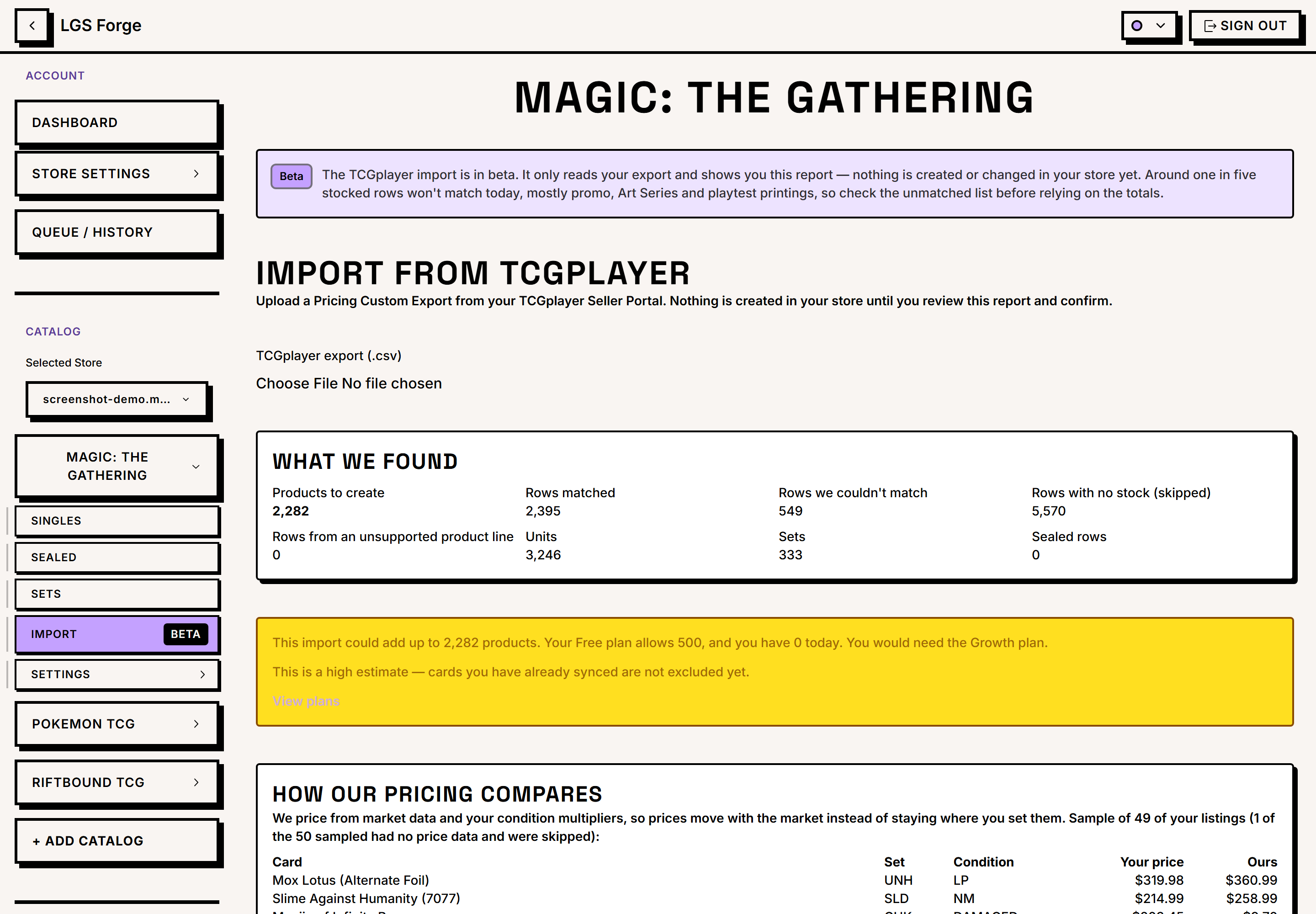
- Products to create — one per distinct card, however many conditions you stock it in, plus any sealed products you're bringing in (counted separately below).
- Rows matched — lines we found in our catalog.
- Rows we couldn't match — a sample of the reasons. Art Series and playtest cards are the usual ones; we don't carry them yet.
- Rows with no stock — any line with
Total Quantityof 0 is skipped. - Rows from an unsupported product line — rows in your export that aren't Magic (this import handles Magic only, see above).
- Sealed products to import — booster boxes, bundles, and similar. We match these by name against TCGplayer's own product list; see Sealed products below.
- Sealed rows we couldn't match — a sample of the sealed items we couldn't find in our catalog, so you know what won't come across.
- How our pricing compares — a sample of your listings beside the price we will set. We price from market data and your condition multipliers, so your prices move with the market instead of staying where you set them.
Running the import
When the report looks right, press Run import. We create the matched cards and sealed products in your store and set each one's stock to the Total Quantity in your file.
A large import takes 15–25 minutes. It runs in the background, so you can close the page and come back — the progress and the final summary are waiting for you.
A few things worth knowing before you press it:
- Only the cards and sealed products you listed. We create the specific items in your export, not every card in the sets they belong to.
- Stock is set, not added. Each item's quantity becomes exactly what your file says. That makes re-importing the same export safe — run it twice and you get the same stock, not double. The trade-off: if you sell something in Shopify and then import an older export, the import puts the old count back.
- Rows we couldn't match are skipped, as are rows with no stock. The report lists them so you know what didn't come across.
- You choose the pricing — see below.
- A card or sealed product that fails doesn't stop the import. Failures are counted in the summary and the rest still come through.
Sealed products
Rows with a condition of Unopened are sealed products — booster boxes, bundles, and similar. We match them by name against TCGplayer's own product list, so a sealed product we don't carry in our catalog shows up on the preview under Sealed rows we couldn't match rather than being guessed at.
Sealed quantities are set, not added, the same as cards: the Total Quantity column is treated as your whole on-hand count, so re-running the same file leaves you with the same number on the shelf rather than double.
Sealed products don't get the daily price update that keeps card prices moving with the market. We price a new sealed product once, when we create it — from our catalog data, or from your file if you chose Keep the prices in my file. After that it stays put until you change it yourself, in Shopify or by importing an updated file.
Pricing: ours or yours
Before you run the import, pick one:
Use my store's pricing rules (the default). We price from market data and your condition multipliers, and the daily price update keeps those prices moving with the market. This is how everything else in LGS Forge prices cards.
Keep the prices in my file. We set each card to the TCG Marketplace Price from your export and hold it there — the daily price update skips the product entirely.
Two things to know about holding your prices:
- A card you listed in only one condition still gets a Near Mint variant, because Shopify's Condition option requires one. That variant is priced by us, and holding your prices holds that one too.
- There is no unlock button. To let a product's prices move with the market again, clear its Price Locked metafield in Shopify admin (Products → the product → Metafields). The next daily price update picks it up from there.
Conditions
Your export carries the condition in each row (Lightly Played, Near Mint Foil, and so on). We create only the conditions you actually stock — not condition variants for your whole catalog — plus Near Mint, which Shopify's Condition option requires. So a card you listed only as Lightly Played still gets a Near Mint variant, priced from our market data.
Your store-wide condition setting isn't changed by an import.
Plan limits
If bringing these products in would take you past your plan's product limit, the report says so and names the plan you would need, and Run import is refused until you upgrade.
That first estimate is deliberately high: it counts every matched card as new, including ones you have already synced. Press Check exactly to have us work out the real number of new products — if you already carry most of these cards, it is usually much lower, and often low enough that you don't need to upgrade at all.